miStudio: Mechanistic Interpretability Workbench
An end-to-end workbench for training, understanding, and using mechanistic-interpretability sparse autoencoders (SAEs) — now with automated feature clustering, cross-layer circuit discovery, resumable labeling that knows what is left and why, an agent-controllable MCP server, plus HuggingFace and Neuronpedia integration and real-time model steering.
miStudio is an end-to-end mechanistic interpretability platform built to replace the fragmented tooling that AI-safety research usually depends on. The work of understanding what happens inside a model — training sparse autoencoders, discovering features, labeling them, and proving what they do — is normally scattered across Jupyter notebooks and one-off scripts. miStudio consolidates all of it into a single, database-backed workbench, so researchers can go from a hypothesis to a proven intervention in a fraction of the usual time.
The research pipeline
miStudio supports the full sparse-autoencoder (SAE) workflow in one place:
- Select and pull models & datasets — direct HuggingFace integration brings models and data into the environment without extra manual steps.
- Train SAEs — train new sparse autoencoders against the model activations you care about.
- Discover features — surface the interpretable features the SAE has learned.
- Label features — annotate what each feature appears to mean.
- Test with causal intervention — confirm a feature’s role by intervening on it and observing the effect, not just correlating.
- Export — push results back out for sharing and further analysis.
Because the platform is database-backed, every experiment is tracked — no more guessing which notebook produced which result.
Real-time steering
A standout capability is robust, real-time steering. miStudio lets you steer model behavior across multiple features, multiple strengths, and multiple prompts at once — the practical way to test and refine hypotheses about what a feature actually means. Instead of theorizing about a feature in isolation, you can watch how amplifying or suppressing it changes real generations.
New: clustering, circuit discovery, and agent control
miStudio has grown beyond single-feature analysis into finding and proving the structure of what a model computes — and letting an AI agent drive the whole process.
Feature clustering
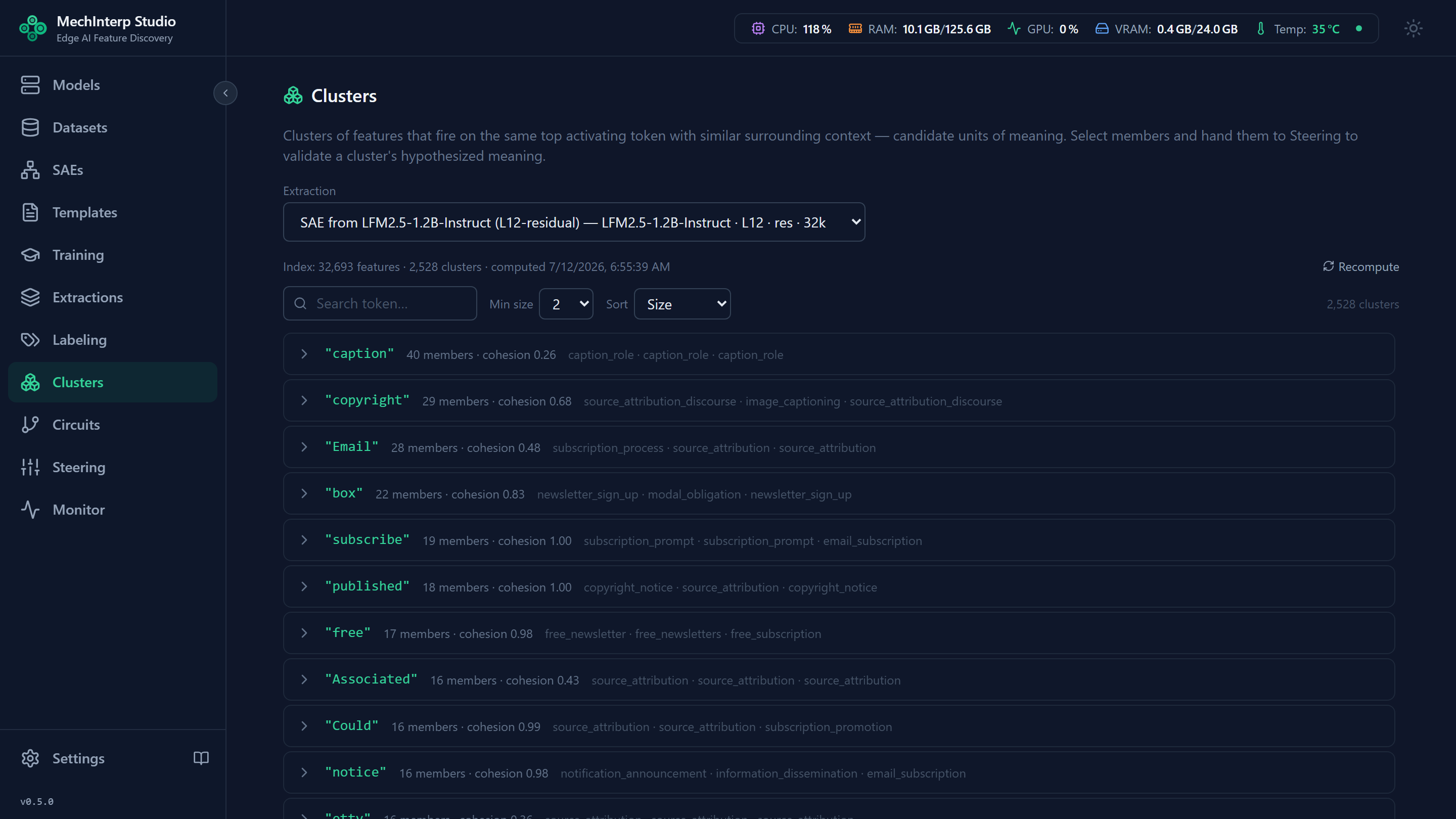
A single SAE extraction can surface tens of thousands of features, with related concepts scattered across them. The Feature Groups panel automatically gathers features that share meaning — indexed by their top activating token and contextual similarity, each group scored by a “cohesion” measure. You can then validate a group’s hypothesized meaning by steering its members together.
Automated circuit discovery
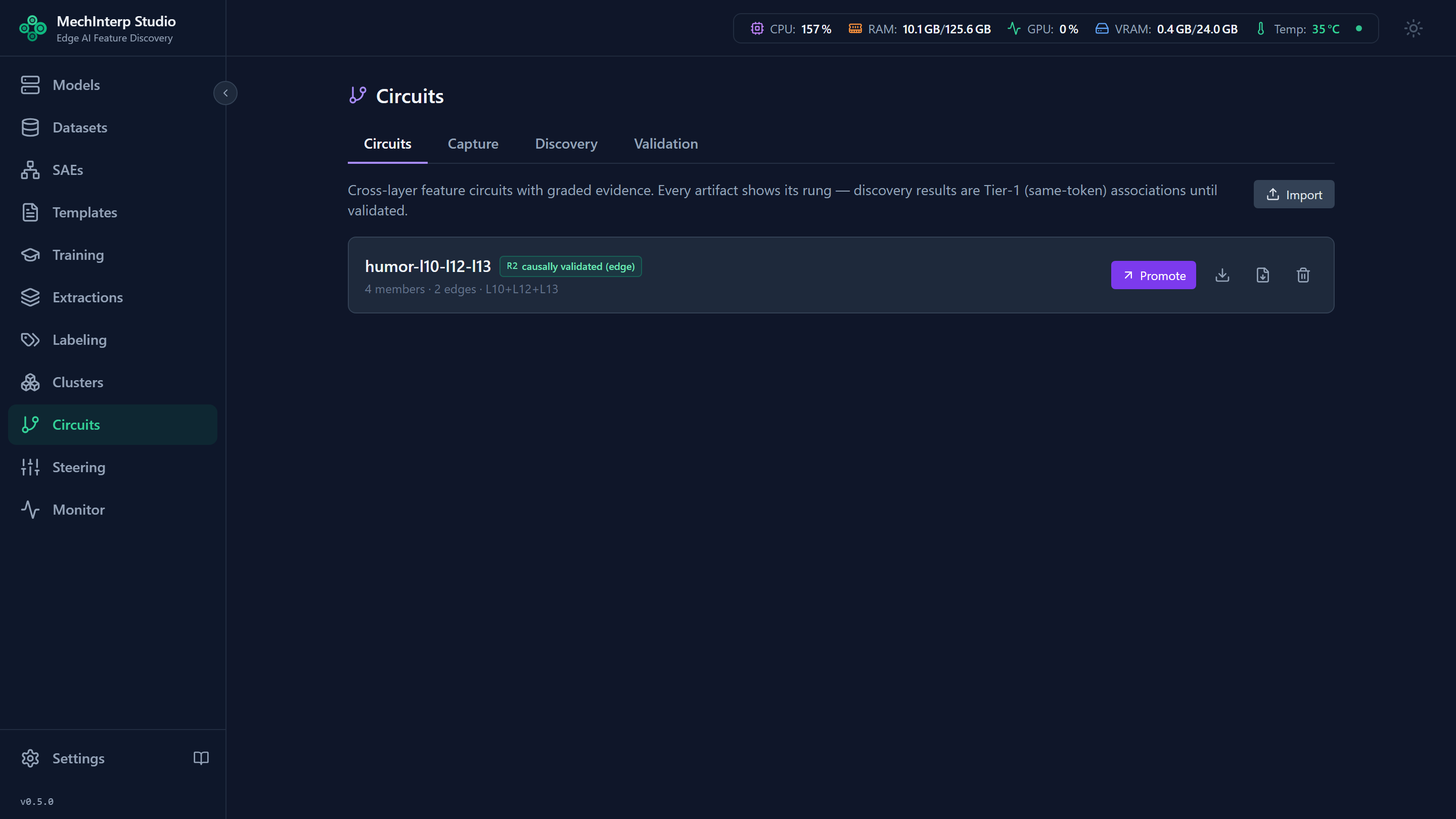
miStudio now discovers circuits — how an upstream feature at one layer drives a downstream one across the model’s depth — automatically, instead of requiring hand-built graphs. It runs a four-stage evidence loop: capture multi-layer activations, mine candidates with statistically sound methods (PMI ranking, null-model testing, Benjamini–Hochberg FDR correction, held-out replication), add gradient attribution as an independent signal, then causally validate by suppressing upstream features and measuring the downstream drop. Every candidate carries disclosed statistics along an evidence ladder — from statistical association to causally validated.
Agent control via MCP
An optional MCP (Model Context Protocol) server exposes the whole post-extraction workflow — feature analysis, clustering, circuit discovery, steering, calibration, and label write-back — as tools for agentic clients like Claude Code. It ships 139 tools across 15 categories (including a set that drives miLLM’s production serving), so an agent can run the full analyze → group → steer → relabel loop autonomously, with every result immediately visible in the miStudio UI.
Labeling at scale — knowing what is left
Interpreting a 53,000-feature extraction takes days of GPU time and gets interrupted. miStudio now records the outcome of every labeling attempt separately from the label itself, which turns out to matter more than it sounds: previously a failed attempt was written as a placeholder label, so 16,824 failures across our own estate looked like finished work — one extraction had carried 2,161 of them silently since April.
Each extraction now shows a coverage strip — adjudicated · failed · not attempted — with a breakdown of why the failures failed, grouped by cause and linked to real examples. A feature the judge honestly found uninterpretable counts as adjudicated: that is a result, not a gap, and it is never redone.
The practical payoff is a cheaper decision. Retrying 14,560 failures is about thirty-two GPU-hours, so miStudio offers a twenty-feature sample first — roughly three minutes, after which the coverage strip tells you whether they still fail. On our L46 extraction the sample recovered 20 of 20, but 18 came back as honest refusals, which reframed the remaining work from “recover 14,560 labels” to “gain ~1,450 labels and permanently close ~13,100 features”. That is a decision worth three minutes rather than thirty-two hours.
From there, Resume labels one batch, or Resume all sweeps many batches unattended under a required ceiling — the confirmation states the cost in GPU-hours before anything starts, and stopping is cooperative. Labels also record which judge produced them, fingerprinted by prompt and model, so improving a template marks exactly the affected verdicts stale instead of forcing a relabel-everything run.
Built to connect
miStudio is designed to fit into the wider interpretability ecosystem:
- HuggingFace — pull models and datasets in; push newly trained SAEs back out for the community to use.
- Neuronpedia — push labeling results directly into a Neuronpedia instance for deeper analysis and collaboration.
A companion server: miLLM
miStudio pairs with MechInterp LLM Server (miLLM). Each application stands on its own, but together they form a complementary workflow: miStudio handles the discovery, training, labeling, testing, and export of interpretable features, while miLLM puts those features to work in a serving context.
Explore miStudio
- Documentation — The Researcher’s Journey | miStudio Manual
- Overview video — MechInterp Studio on YouTube
- YouTube channel — @miStudio-hitsai
- Source code — github.com/hitsainet/miStudio